
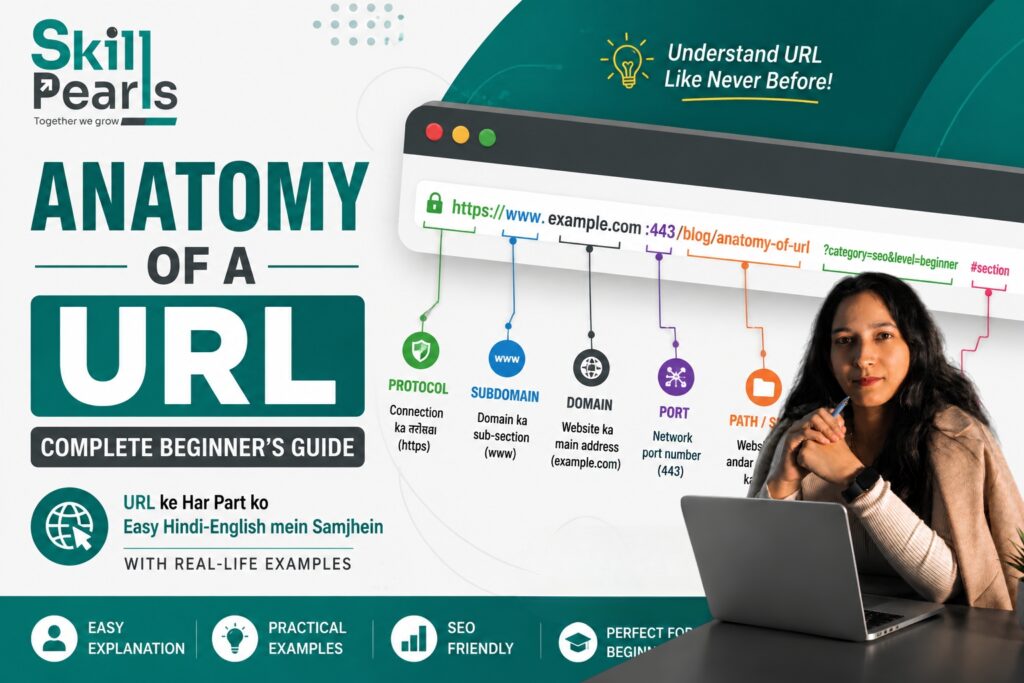
जब भी हम Internet पर कोई Website खोलते हैं, Browser के ऊपर एक Address दिखाई देता है।
उदाहरण: https://www.Skillpearls.com/blog/digital-marketing?category=seo#introduction
क्या आपने कभी सोचा है कि इस पूरे Address में इतने सारे हिस्से क्यों होते हैं? https:// क्या है? www क्यों लिखा है? Skillpearls.com क्या बताता है? /blog/digital-marketing का क्या मतलब है? ?category=seo और #introduction किस काम आते हैं?
इन सभी हिस्सों को समझना ही Anatomy of a URL कहलाता है। यह Concept Website Development, SEO, Digital Marketing और Content Writing सीखने वाले हर व्यक्ति के लिए उपयोगी है।
URL क्या होता है?
URL का Full Form Uniform Resource Locator है। सरल भाषा में, URL Internet पर किसी specific Web Page, File या Resource का Address होता है।
| आसान उदाहरण जैसे आपके घर का Address आपको किसी Physical Location तक पहुँचाता है, वैसे ही URL Browser को Internet पर किसी Resource तक पहुँचने का रास्ता बताता है। |
URL का Basic Structure
एक URL कई अलग-अलग Parts से मिलकर बना हो सकता है। उदाहरण:
https://www.Skillperals.com:443/blog/seo-basics?topic=seo#introduction
| URL Part | Example | काम |
| Protocol / Scheme | https:// | Connection का तरीका |
| Subdomain | www | Domain के अंदर Subdomain |
| Domain Name | Skillpearls.com | Website का मुख्य Address |
| Port | :443 | Network Port |
| Path | /blog/seo-basics | Resource का रास्ता |
| Query Parameter | ?topic=seo | Extra Information |
| Fragment | #introduction | Page के specific हिस्से तक ले जाता है |
1. Protocol / Scheme क्या है?
URL का पहला हिस्सा अक्सर Protocol या Scheme होता है। उदाहरण: https://. यह Browser को बताता है कि Server के साथ किस प्रकार का Connection इस्तेमाल करना है।
HTTP और HTTPS
HTTP का अर्थ Hypertext Transfer Protocol और HTTPS का अर्थ Hypertext Transfer Protocol Secure है। HTTPS में Browser और Server के बीच Connection को TLS के माध्यम से सुरक्षित किया जाता है।
| याद रखेंHTTP → Web Communication | HTTPS → Secure Web Communication |
2. Subdomain क्या होता है?
Domain Name से पहले आने वाला हिस्सा Subdomain हो सकता है। उदाहरण: https://blog.example.com में blog Subdomain और example.com Main Domain है।
- blog.example.com → Blog Section
- shop.example.com → Online Store
- support.example.com → Customer Support
क्या www भी Subdomain है?
हाँ। www.Skillpearls.com में www technically एक Subdomain है। आज बहुत सी Websites www के बिना भी काम करती हैं।
3. Domain Name क्या है?
Domain Website की मुख्य पहचान और Internet Address होता है। उदाहरण: https://www.example.com में example.com Domain है।
Domain को सामान्यतः Domain Name और Top-Level Domain (TLD) में समझा जा सकता है: example + .com = example.com
4. Top-Level Domain (TLD) क्या है?
Domain के अंतिम हिस्से को Top-Level Domain या TLD कहा जाता है।
- .com → Business और General Websites में Common
- .org → Organizations के लिए अक्सर उपयोग
- .edu → Educational Institutions से जुड़े Domains में उपयोग, eligibility rules पर निर्भर
- .gov → Government Websites
- .in → India का Country-Code Top-Level Domain
5. Port क्या होता है?
कभी-कभी URL में Port Number भी दिखाई देता है। उदाहरण: https://example.com:443 में 443 Port है। Commonly HTTP Port 80 और HTTPS Port 443 से जुड़े होते हैं। Standard Port अक्सर URL में दिखाई नहीं देते।
6. Path क्या होता है?
Domain के बाद URL में आने वाला हिस्सा अक्सर Path कहलाता है। उदाहरण: https://Skillpearls.com/blog/seo-basics में /blog/seo-basics Path है।
- /blog → Blog Section
- /courses → Courses Section
- /courses/digital-marketing → Digital Marketing Course Page
| आसान समझ Path Website के अंदर किसी Resource तक जाने का रास्ता बताता है। |
7. Slug क्या होता है?
Slug URL का वह readable हिस्सा होता है जो अक्सर किसी specific Page या Blog Post की पहचान करता है। उदाहरण: example.com/blog/digital-marketing-guide में digital-marketing-guide Slug है।
- छोटा और स्पष्ट रखें
- Topic से Relevant रखें
- अनावश्यक Words से बचें
- Words के बीच Hyphen का उपयोग करें
| उदाहरण अच्छा: /Skillpearls-digital-marketing-guide | कम स्पष्ट: /blog123/page?id=7845 |
8. Query Parameters क्या होते हैं?
URL में ? के बाद आने वाला हिस्सा Query String या Query Parameters का हिस्सा हो सकता है। उदाहरण: https://example.com/products?category=shoes
यहाँ ? Query की शुरुआत करता है, category Parameter Name है और shoes Parameter Value है।
Multiple Query Parameters
एक URL में एक से अधिक Parameters हो सकते हैं। उदाहरण: https://example.com/products?category=shoes&color=black&size=9
| Practical Example यह URL Website को Shoes Category, Black Color और Size 9 जैसी Filter Information दे सकता है। |
9. Fragment क्या होता है?
URL में # के बाद आने वाले हिस्से को Fragment कहा जाता है। उदाहरण: https://example.com/blog/seo#keyword-research में #keyword-research Fragment है।
Fragment का उपयोग Page के किसी specific Section तक User को पहुँचाने के लिए किया जा सकता है, यदि Page में matching anchor मौजूद हो।
पूरा URL एक साथ समझें
https://blog.Skillpearls.com:443/seo/keyword-research?language=hindi&level=beginner#tools
| Part | Value |
| Protocol | https |
| Subdomain | blog |
| Domain | example.com |
| Port | 443 |
| Path | /seo/keyword-research |
| Query | ?language=hindi&level=beginner |
| Fragment | #tools |
URL और SEO का क्या संबंध है?
URL SEO का एक हिस्सा है, लेकिन URL अकेले Ranking तय नहीं करता। Clear URL User और Search Engine दोनों को Page के Topic को समझने में मदद कर सकता है।
| उदाहरण Skillpearls.com/blog/seo-basics Page के Topic का संकेत देता है, जबकि example.com/page?id=7281 से Topic तुरंत स्पष्ट नहीं होता। |
SEO-Friendly URL कैसे बनाएं?
1. URL को Simple रखें
example.com/seo-guide
2. Relevant Words का उपयोग करें
example.com/digital-marketing-course
3. Unnecessary Parameters से बचें
जहाँ जरूरत न हो, बहुत लंबे और confusing URLs न बनाएं।
4. Hyphen का उपयोग करें
digital-marketing-guide
5. URL को जरूरत से ज्यादा लंबा न बनाएं
Readable और Relevant Structure रखें।
Hyphen और Underscore में क्या अंतर है?
URL Slugs में Words को अलग करने के लिए Hyphen का उपयोग बहुत Common और Readable है।
| Recommended digital-marketing-guide |
| कम Common for Slugs digital_marketing_guide |
Uppercase और Lowercase URL
कुछ Servers पर /SEO और /seo अलग Resources हो सकते हैं। इसलिए Website में URL Naming के लिए एक Consistent Convention रखना बेहतर है।
| Recommended Convention Lowercase + Short URLs + Hyphens + Meaningful Words + Consistent Structure |
URL में Space क्यों नहीं होना चाहिए?
URL में सामान्य Spaces सीधे इस्तेमाल नहीं किए जाते। Readable URLs के लिए Words को Hyphen से अलग करना सामान्य Practice है।
| Better digital-marketing-guide |
URL और Website Navigation का संबंध
URL Website की Structure को समझने में भी मदद कर सकता है।
- Skillpearls.com/courses → Courses Section
- Skillpearls.com/courses/digital-marketing → Digital Marketing Course
- Skillpearls.com/courses/digital-marketing/seo → SEO से संबंधित Section
URL और User Experience
Clear URL User को Page के बारे में पहले से अंदाजा दे सकता है। उदाहरण: example.com/blog/website-development-guide अधिक स्पष्ट है, जबकि example.com/page?id=78291 कम स्पष्ट है।
| Simple Principle Clear URL → Better Understanding |
URL में Case Sensitivity क्यों महत्वपूर्ण है?
कुछ Web Servers पर /Blog और /blog अलग-अलग URLs हो सकते हैं। इसलिए Website Development में URL Naming Convention पहले से तय करना अच्छा Practice है।
URL Canonicalization क्या है?
कभी-कभी एक ही Content तक पहुँचने के लिए कई URL Variations हो सकते हैं। SEO में Search Engines को Preferred URL के बारे में स्पष्ट संकेत देना महत्वपूर्ण हो सकता है। इसके लिए Canonical URL जैसे Signals का उपयोग किया जाता है।
URL Redirect क्या होता है?
जब किसी Page का पुराना URL बदल जाता है, तो User को नए URL पर भेजने के लिए Redirect का उपयोग किया जा सकता है। 301 Redirect Permanent Move का संकेत देता है।
| Example Old: example.com/old-blog → New: example.com/new-blog |
URL में www जरूरी है या नहीं?
नहीं। www.Skillpearls.com और Skillpearls.com में से कोई एक Preferred Version हो सकता है। महत्वपूर्ण यह है कि Website एक Consistent Preferred Version रखे और दूसरे Version को सही तरीके से Redirect या Canonicalize करे।
URL में HTTPS क्यों जरूरी है?
HTTPS Website Security के लिए महत्वपूर्ण है। यह Browser और Server के बीच Data को Encrypt करने में मदद करता है। Login, Forms, Personal Information, Payments और User Accounts वाली Websites में Secure Connection विशेष रूप से महत्वपूर्ण है।
Students के लिए Practical Exercise
https://Skillpearls.example.com/courses/digital-marketing?level=beginner#syllabus
- Protocol → https
- Subdomain → learn
- Domain → example.com
- Path → /courses/digital-marketing
- Query Parameter → ?level=beginner
- Fragment → #syllabus
| Practice Tip अपनी किसी Website के 5 URLs खोलें और हर URL में Protocol, Domain, Path, Query और Fragment पहचानने की कोशिश करें। |
URL सीखना Website Development Students के लिए क्यों जरूरी है?
- Website Structure
- Navigation
- SEO
- Page Creation
- Blog Management
- Redirects
- Website Migration
- Analytics
- Debugging
- Search Console
- Server Configuration
Digital Marketers के लिए URL क्यों महत्वपूर्ण है?
Digital Marketing में SEO Campaigns, Google Ads, Social Media Campaigns, Email Marketing, Landing Pages और Analytics के दौरान URLs के साथ काम करना पड़ता है।
| Example Google Ads में Specific Landing Page का URL इस्तेमाल किया जा सकता है; SEO में URL Structure और Content Relevance का ध्यान रखा जाता है। |
Common URL Mistakes
1. बहुत लंबे URLs
अनावश्यक रूप से लंबे URLs User के लिए confusing हो सकते हैं।
2. Random Numbers
Meaningful URLs आमतौर पर Page Topic को ज्यादा स्पष्ट करते हैं।
3. Unnecessary Parameters
जहाँ आवश्यकता न हो, बहुत सारे Parameters से URL Complicated हो सकता है।
4. Inconsistent Structure
Uppercase और Lowercase का बिना योजना उपयोग Management को कठिन बना सकता है।
5. URL बदलना और Redirect न करना
पुराने URL को बदलने के बाद सही Redirect Strategy रखना महत्वपूर्ण है।
6. Keyword Stuffing
URL में बहुत सारे Keywords भरना जरूरी नहीं है। Simple + Relevant + Readable URL बेहतर Approach है।
SEO-Friendly URL का Example
मान लीजिए आपका Blog है: “Digital Marketing Beginners Guide”
| Poor URL Skillpearls.com/article?id=782&cat=12&ref=abc |
| Better URL Skillpearls.com/digital-marketing-beginners-guide |
Better URL छोटा, स्पष्ट, पढ़ने में आसान और Share करने योग्य है।
URL Anatomy को एक Formula से समझें
Scheme + Subdomain + Domain + Port + Path + Query + Fragment
हर URL में ये सभी Parts होना जरूरी नहीं है। URL जितना Simple और Relevant हो, User के लिए उसे समझना उतना आसान हो सकता है।
Quick Revision
| URL का हिस्सा | आसान अर्थ |
| Scheme | Connection का तरीका |
| Subdomain | Main Domain का अलग Section |
| Domain | Website का मुख्य Address |
| TLD | Domain का अंतिम हिस्सा |
| Port | Network Service तक पहुँचने का Port |
| Path | Website के अंदर Resource का रास्ता |
| Slug | Page या Blog की Readable पहचान |
| Query Parameter | Extra Information या Filtering Data |
| Fragment | Page के Specific Section का संकेत |
Frequently Asked Questions (FAQs)
URL का Full Form क्या है?
Uniform Resource Locator.
URL किस काम आता है?
Internet पर किसी Web Page, File या Resource का Address बताने के लिए।
क्या Domain और URL एक ही होते हैं?
नहीं। Domain URL का एक हिस्सा है।
HTTPS क्या है?
Secure Web Communication Protocol जो Browser और Server के बीच Data को Encrypt करने में मदद करता है।
URL में Slug क्या होता है?
Page या Blog Post की Readable पहचान वाला हिस्सा।
Query Parameter क्या है?
URL में ? के बाद दी गई Information, जैसे ?category=seo।
Fragment क्या है?
# के बाद आने वाला हिस्सा, जो Page के किसी Specific Section तक पहुँचने में उपयोग हो सकता है।
Conclusion: URL को समझना क्यों जरूरी है?
URL केवल Browser के ऊपर दिखाई देने वाला Web Address नहीं है। यह Website की Structure, Page Location, Parameters और कभी-कभी Specific Section के बारे में Information देता है।
यदि आप Website Development, SEO, Digital Marketing, WordPress या Web Designing सीख रहे हैं, तो URL Anatomy आपकी Basic Technical Knowledge का महत्वपूर्ण हिस्सा है।
केवल Definition याद न करें। URL को देखकर उसके हर Part को पहचानने की Practice करें।
| याद रखने का आसान Formula Protocol → Domain → Path → Query → Fragment |
Final Thought: “URL सिर्फ एक Address नहीं है; यह Web पर किसी Resource तक पहुँचने का पूरा रास्ता बताता है।”
Learn → Understand → Practice → Build → Improve